Kafka Security for Bucket Notifications in Ceph RGW, Part 2: GSSAPI and OAuthBearer
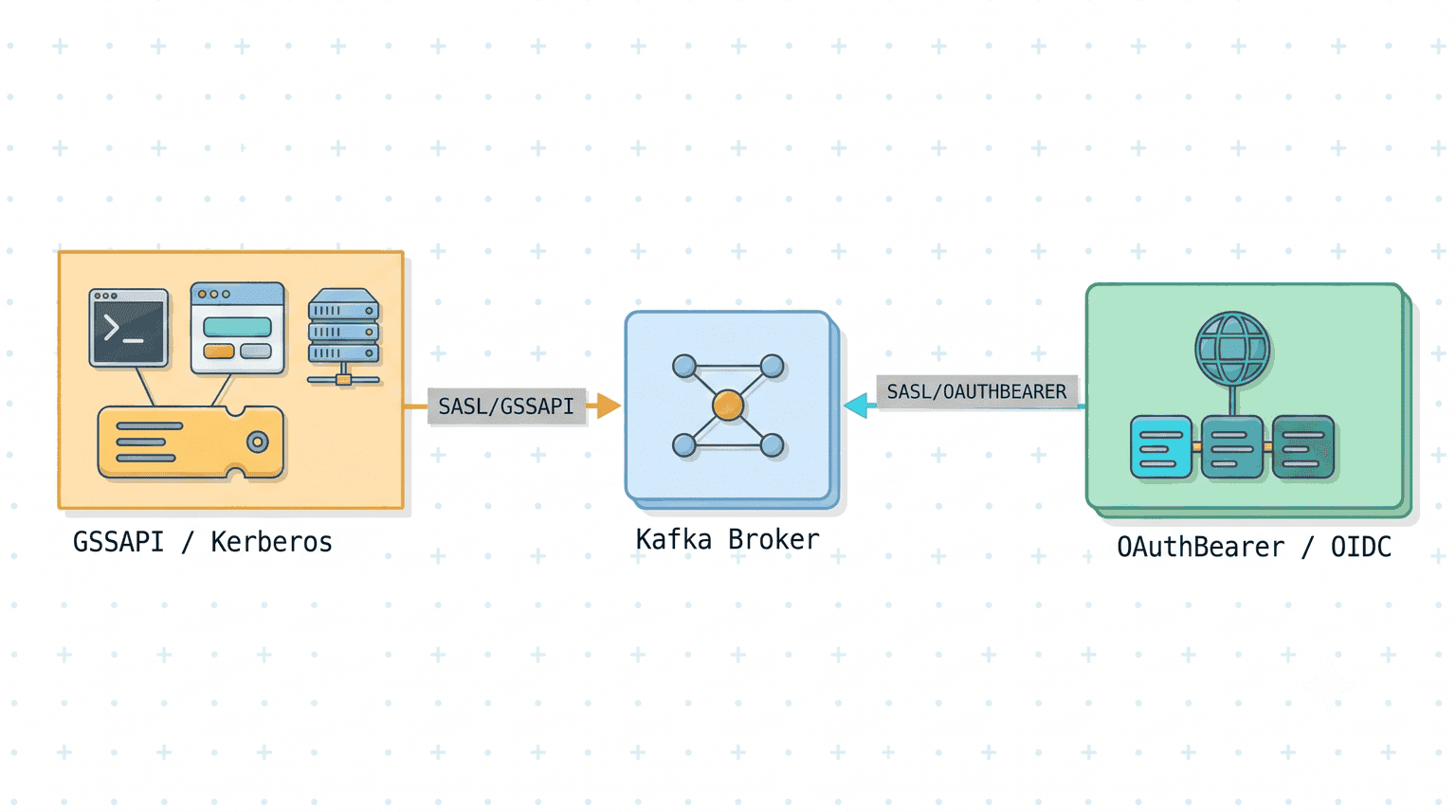
Part 1 split Kafka security into two independent layers: the connection between RGW and the broker (plaintext, TLS, or mTLS) and SASL, which is what tells the broker which user is publishing. This post stays entirely in the second layer. Both mechanisms here are SASL mechanisms, exactly like PLAIN and SCRAM, and they combine with the connection layer the same way.
What changes is where the credential lives. With PLAIN and SCRAM, the password is an attribute of the SNS topic and the broker checks it directly. With these two, a third party vouches for the user instead:
- GSSAPI authenticates with a Kerberos ticket issued by a KDC.
- OAuthBearer authenticates with a JWT issued by an OIDC provider.
Neither puts a broker password in the topic. GSSAPI puts a keytab path there, so the key material stays on the RGW host. OAuthBearer puts an OIDC client ID and secret there, which are credentials for the identity provider, not for the broker; the broker only ever sees a signed, short-lived token.
Note: as of this writing, neither mechanism is in a Ceph release. GSSAPI support was merged to the
mainbranch in ceph/ceph#69200 and is not yet in a release. OAuthBearer support is proposed in ceph/ceph#70100, which is still under review, so its attribute names could change before it merges. Check the notifications documentation for your release before relying on either.
What this post covers 
Two SASL mechanisms, each over a plaintext or a TLS connection from Part 1:
| SASL mechanism | Connection | Kafka protocol | TCP port |
|---|---|---|---|
GSSAPI | plaintext TCP | SASL_PLAINTEXT | 9095 |
GSSAPI | TLS | SASL_SSL | 9094 |
OAUTHBEARER | plaintext TCP | SASL_PLAINTEXT | 9095 |
OAUTHBEARER | TLS | SASL_SSL | 9094 |
The listener definitions from Part 1 do not change; only the enabled mechanism list and the per-listener JAAS configuration grow.
Note: the mTLS row from Part 1 has no counterpart here for GSSAPI. RGW's GSSAPI path configures the CA and certificate verification for a TLS connection, but does not apply
ssl-certificate-locationandssl-key-location, so a GSSAPI topic pointed at an mTLS listener will not present a client certificate.
How RGW connects to Kafka 
As in Part 1, RGW uses librdkafka and maps SNS topic attributes onto librdkafka configuration keys. The difference here is what librdkafka does with them:
- For GSSAPI, it performs the Kerberos SASL negotiation using either a keytab or the system ticket cache, renewing the ticket as needed.
- For OAuthBearer, it runs the OIDC
client_credentialsflow: it fetches a JWT from the token endpoint, presents it to the broker during the SASL handshake, and refreshes it before expiry.
RGW supplies the configuration (mechanism, keytab path, token endpoint URL) and takes no further part in the exchange.
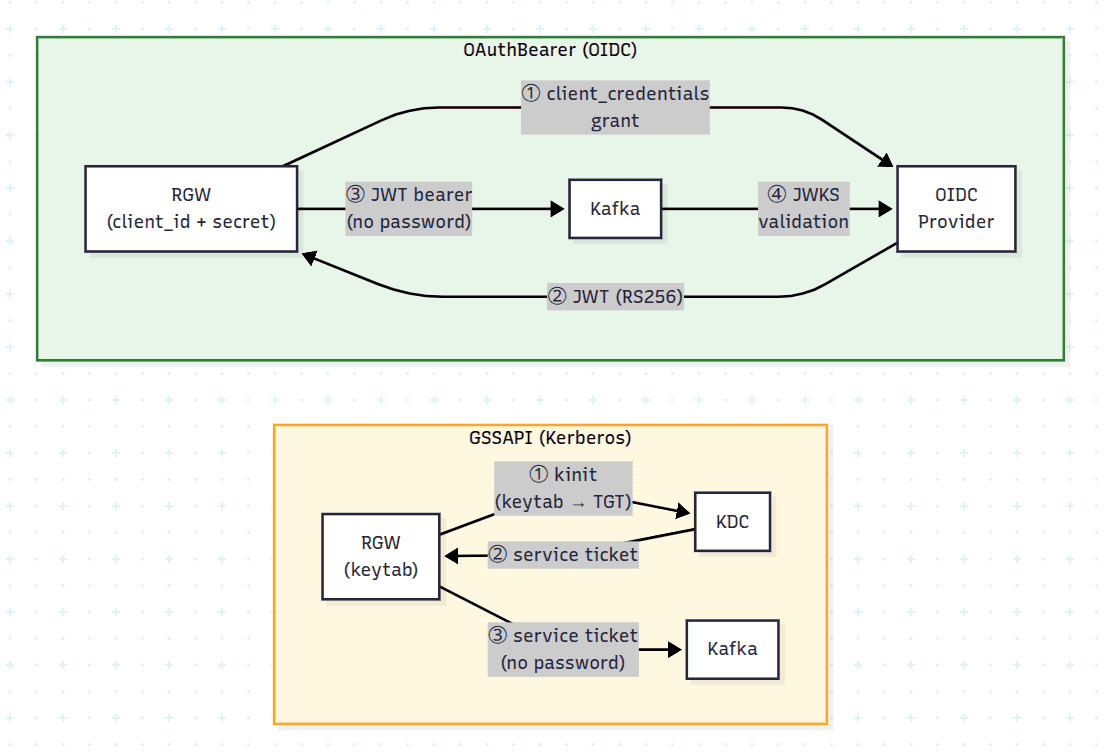
The shape of the work is the same as Part 1: CreateTopic on the SNS endpoint with the mechanism's attributes in the topic's attribute map, then PutBucketNotificationConfiguration on the S3 endpoint pointing a bucket at the ARN it returns. The second call is identical in every section of both posts, and the attribute names below are RGW's, so they are the same whether you send them from boto3, a Java or Go SDK, or the CLI. The aws blocks below are just the shortest way to put an attribute map on the page. Part 1 shows the same two calls in boto3.
GSSAPI (Kerberos) 
GSSAPI support is on the Ceph main branch (ceph/ceph#69200) and, as of this writing, not yet in a release.
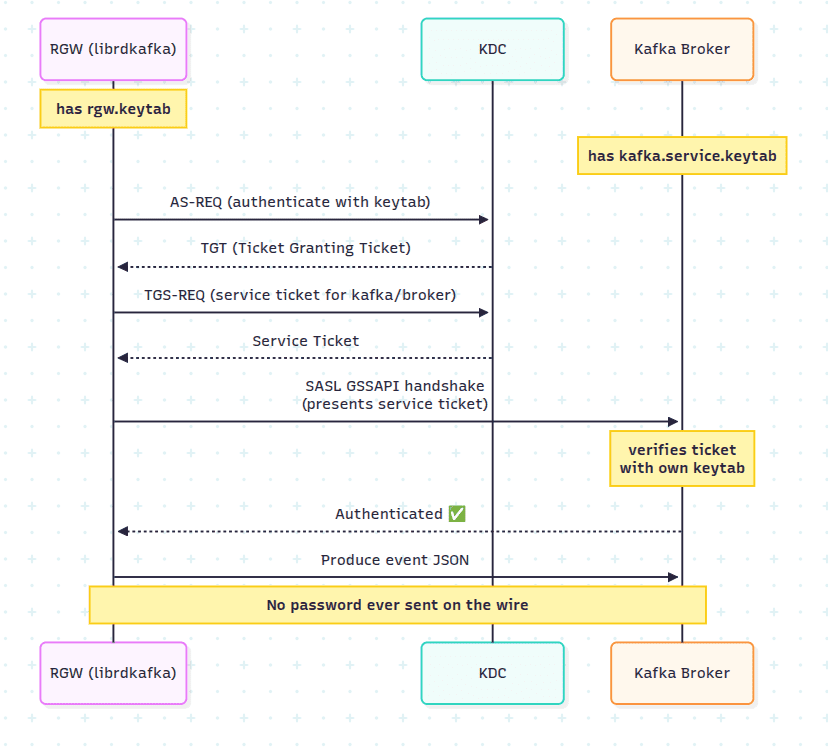
GSSAPI (Generic Security Services Application Program Interface) is the SASL mechanism that carries Kerberos authentication. No password crosses the network: RGW proves knowledge of its key to a Key Distribution Center, and presents the resulting ticket to the broker. What the broker ends up with is a client principal (rgw/rgw.example.com@EXAMPLE.COM below), and that is the SASL user identity, the same slot alice occupied in Part 1. It happens to be a service principal with a hostname in it, but the broker is naming a Kerberos identity, not verifying a machine the way mTLS does. It is the usual choice where a Kerberos infrastructure (Active Directory or MIT Kerberos) already exists.
What you need in place 
Two Kerberos principals, one for the broker and one for RGW, and a keytab for each:
| Principal | Used by | Keytab |
|---|---|---|
kafka/broker.example.com@REALM | Broker | /etc/krb5-keytabs/kafka.service.keytab |
rgw/rgw.example.com@REALM | RGW | /etc/krb5-keytabs/rgw.keytab |
Throughout this section, substitute EXAMPLE.COM with your realm, broker.example.com with the fully qualified hostname of your Kafka broker, and rgw.example.com with your RGW host. The broker's service principal hostname must match the hostname clients use to reach the broker. The RGW principal is only a name, so any principal works there.
Where a Kerberos infrastructure already exists, these are the two principals to request from whoever administers it, along with a keytab for each. With MIT Kerberos they are created with kadmin, or with kadmin.local when running on the KDC host itself:
kadmin -q "addprinc -randkey kafka/broker.example.com@EXAMPLE.COM"
kadmin -q "addprinc -randkey rgw/rgw.example.com@EXAMPLE.COM"

sudo mkdir -p /etc/krb5-keytabs

kadmin -q \
  "ktadd -k /etc/krb5-keytabs/kafka.service.keytab kafka/broker.example.com@EXAMPLE.COM"

kadmin -q \
  "ktadd -k /etc/krb5-keytabs/rgw.keytab rgw/rgw.example.com@EXAMPLE.COM"

sudo chmod 640 /etc/krb5-keytabs/*.keytab
ktadd writes the keytabs on the host where you run kadmin. Copy kafka.service.keytab to the broker host and rgw.keytab to every RGW host, at the same paths.
Set the ownership so that the radosgw process user can read rgw.keytab and the broker's user can read kafka.service.keytab, and no wider than that. A keytab is key material; 0640 with the right group, or 0600 owned by the reading user, is the target. As with the client key in Part 1, the path is resolved on the RGW host, inside the container where RGW is containerized.
Each RGW needs four things:
- The GSSAPI SASL plugin, since librdkafka uses the system Cyrus SASL plugins:
libsasl2-modules-gssapi-miton Debian and Ubuntu,cyrus-sasl-gssapion Fedora and RHEL. - The
kinitcommand (krb5-useron Debian and Ubuntu,krb5-workstationon Fedora and RHEL). librdkafka runs it to get a ticket from the keytab and to renew it. - The RGW keytab, readable by the
radosgwprocess user. /etc/krb5.conf, declaring the realm and pointing at the KDC:
[libdefaults]
    default_realm = EXAMPLE.COM
    dns_lookup_realm = false
    dns_lookup_kdc = false
    rdns = false
    forwardable = true
    ticket_lifetime = 24h
    renew_lifetime = 7d

[realms]
    EXAMPLE.COM = {
        kdc = kdc.example.com
        admin_server = kdc.example.com
    }

[domain_realm]
    .example.com = EXAMPLE.COM
    example.com = EXAMPLE.COM
Where RGW runs in a container under cephadm, all four must be inside the container. The SASL plugin and kinit have to be part of the RGW container image, so if your image doesn't include them, build a derived image that adds them. Mount /etc/krb5.conf and the keytab with extra_container_args in the RGW service specification, then apply it with ceph orch apply -i rgw.yaml and run ceph orch redeploy rgw.default:
service_type: rgw
service_id: default
placement:
  label: rgw
extra_container_args:
  - "-v"
  - "/etc/krb5.conf:/etc/krb5.conf:ro"
  - "-v"
  - "/etc/krb5-keytabs/rgw.keytab:/etc/krb5-keytabs/rgw.keytab:ro"
Confirm the keytab works before touching Kafka:
klist -kte /etc/krb5-keytabs/rgw.keytab
kinit -kt /etc/krb5-keytabs/rgw.keytab rgw/rgw.example.com@EXAMPLE.COM
klist          # should show a valid TGT
kdestroy
Setting up a test realm 
Skip this if a KDC already exists. To try GSSAPI without one, a single-host Kerberos realm is enough:
On Debian and Ubuntu:
sudo apt install -y krb5-kdc krb5-admin-server krb5-user

# Creates the realm database; prompts for a master password
sudo kdb5_util create -s -r EXAMPLE.COM

echo '*/admin@EXAMPLE.COM    *' | sudo tee /etc/krb5kdc/kadm5.acl

sudo systemctl enable --now krb5-kdc krb5-admin-server
sudo systemctl status krb5-kdc krb5-admin-server    # both should be active
On Fedora and RHEL, the packages, the ACL path, and the service names differ:
sudo dnf install -y krb5-server krb5-workstation

sudo kdb5_util create -s -r EXAMPLE.COM

echo '*/admin@EXAMPLE.COM    *' | sudo tee /var/kerberos/krb5kdc/kadm5.acl

sudo systemctl enable --now krb5kdc kadmin
sudo systemctl status krb5kdc kadmin    # both should be active
Point kdc and admin_server in /etc/krb5.conf at this host, make sure the hostnames used resolve, adding them to /etc/hosts if there is no DNS record, and then create the principals and keytabs with kadmin.local as above.
Broker configuration 
Create $KAFKA_HOME/config/kafka_server_jaas.conf:
KafkaServer {
    com.sun.security.auth.module.Krb5LoginModule required
    useKeyTab=true
    storeKey=true
    keyTab="/etc/krb5-keytabs/kafka.service.keytab"
    principal="kafka/broker.example.com@EXAMPLE.COM";
};
Add GSSAPI to server.properties. The listener definitions from Part 1 are unchanged; only the mechanism list and the per-listener JAAS configuration are new:
# Add GSSAPI to the enabled mechanisms
sasl.enabled.mechanisms=PLAIN,SCRAM-SHA-256,SCRAM-SHA-512,GSSAPI
sasl.kerberos.service.name=kafka

# SASL_PLAINTEXT listener: GSSAPI
listener.name.sasl_plaintext.gssapi.sasl.jaas.config=\
  com.sun.security.auth.module.Krb5LoginModule required \
  useKeyTab=true \
  storeKey=true \
  keyTab="/etc/krb5-keytabs/kafka.service.keytab" \
  principal="kafka/broker.example.com@EXAMPLE.COM";

# SASL_SSL listener: GSSAPI
listener.name.sasl_ssl.gssapi.sasl.jaas.config=\
  com.sun.security.auth.module.Krb5LoginModule required \
  useKeyTab=true \
  storeKey=true \
  keyTab="/etc/krb5-keytabs/kafka.service.keytab" \
  principal="kafka/broker.example.com@EXAMPLE.COM";
Note:
inter.broker.listener.name=PLAINTEXTfrom Part 1 stays as it is. GSSAPI applies to client-to-broker connections, not inter-broker traffic.
The broker reads the JAAS file from a JVM property, which Kafka takes from KAFKA_OPTS:
export KAFKA_OPTS="-Djava.security.auth.login.config=${KAFKA_HOME}/config/kafka_server_jaas.conf"

kafka-server-start.sh ${KAFKA_HOME}/config/server.properties
KAFKA_OPTS must be set in every shell that starts the broker or runs a Kafka CLI tool against a GSSAPI listener. Without it, the JVM fails with Could not find a 'KafkaClient' entry in the JAAS configuration.
Check the broker with the Kafka CLI 
Verifying with the Java tools first separates a Kerberos or broker problem from an RGW one. The CLI needs its own JAAS file, using the RGW principal:
cat > /tmp/client_jaas.conf <<'EOF'
KafkaClient {
    com.sun.security.auth.module.Krb5LoginModule required
    useKeyTab=true
    storeKey=true
    keyTab="/etc/krb5-keytabs/rgw.keytab"
    principal="rgw/rgw.example.com@EXAMPLE.COM";
};
EOF

cat > /tmp/gssapi-client.properties <<'EOF'
security.protocol=SASL_PLAINTEXT
sasl.mechanism=GSSAPI
sasl.kerberos.service.name=kafka
EOF

# Client JAAS, separate from the broker's KAFKA_OPTS above
export KAFKA_OPTS="-Djava.security.auth.login.config=/tmp/client_jaas.conf"

kafka-topics.sh \
  --bootstrap-server broker.example.com:9095 \
  --command-config /tmp/gssapi-client.properties \
  --create \
  --topic gssapi-plaintext-notifications \
  --partitions 1 \
  --replication-factor 1
Created topic gssapi-plaintext-notifications. means the Kerberos handshake succeeded. That is also the topic the SNS topic below publishes to, so creating it here saves creating it again.
Note:
TGT renewal thread has been interrupted and will exitwhen the tool exits is expected. It is the background ticket renewal thread stopping with the JVM.
GSSAPI over SASL_PLAINTEXT 
RGW's default Kerberos service name, rgw_kafka_sasl_kerberos_service_name, is already kafka, which matches the broker principal here. Set it only if your broker's principal uses a different service name:
ceph config set client.rgw rgw_kafka_sasl_kerberos_service_name <service-name>
Create the SNS topic:
aws --endpoint-url $RGW sns create-topic \
  --name gssapi-plaintext-notifications \
  --attributes '{
    "push-endpoint": "kafka://broker.example.com:9095",
    "kafka-ack-level": "broker",
    "use-ssl": "false",
    "mechanism": "GSSAPI",
    "sasl-kerberos-service-name": "kafka",
    "sasl-kerberos-principal": "rgw/rgw.example.com@EXAMPLE.COM",
    "sasl-kerberos-keytab": "/etc/krb5-keytabs/rgw.keytab"
  }'
| Attribute | Value | Description |
|---|---|---|
mechanism | GSSAPI | Selects SASL/GSSAPI |
sasl-kerberos-service-name | kafka | Service component of the broker's principal |
sasl-kerberos-principal | rgw/<host>@REALM | Client principal RGW authenticates as |
sasl-kerberos-keytab | path to .keytab | Key material for the client principal |
Note:
sasl-kerberos-principalandsasl-kerberos-keytabare optional. If both are omitted, librdkafka falls back to the system Kerberos ticket cache (the result of a previouskinit). Supply a keytab in production, so that delivery does not depend on an operator having runkinitand on that ticket still being valid.
Note:
sasl-kerberos-service-namecan also be set per topic, and a per-topic value overridesrgw_kafka_sasl_kerberos_service_name. Where different tenants authenticate as different principals, supply all three attributes per topic. RGW's connection cache is keyed on the connection settings, including the Kerberos service name, principal, and keytab path, so topics with different principals do not share a producer connection.
Attach it to a bucket, with the same PutBucketNotificationConfiguration call as every section of Part 1:
aws --endpoint-url $RGW s3 mb s3://gssapi-bucket

aws --endpoint-url $RGW s3api put-bucket-notification-configuration \
  --bucket gssapi-bucket \
  --notification-configuration '{
    "TopicConfigurations": [{
      "Id": "gssapi-notif",
      "TopicArn": "arn:aws:sns:default::gssapi-plaintext-notifications",
      "Events": ["s3:ObjectCreated:*"]
    }]
  }'
The later sections change only the bucket name and the TopicArn.
Then trigger an event and watch for it:
# Consumer terminal: needs KAFKA_OPTS with the client JAAS file
export KAFKA_OPTS="-Djava.security.auth.login.config=/tmp/client_jaas.conf"
kafka-console-consumer.sh \
  --bootstrap-server broker.example.com:9095 \
  --consumer.config /tmp/gssapi-client.properties \
  --topic gssapi-plaintext-notifications \
  --from-beginning

# elsewhere
echo "hello gssapi" > /tmp/gssapi-test.txt
aws --endpoint-url $RGW s3 cp /tmp/gssapi-test.txt s3://gssapi-bucket/gssapi-test.txt
Two logs are worth checking. The RGW log shows which mechanism was configured when RGW opened the connection. That line is logged at level 20 of the rgw_notification subsystem, as in Part 1, so raise the level first:
ceph config set client.rgw debug_rgw_notification 20
cephadm logs --name rgw.<id> | grep "Kafka connect:"
# Kafka connect: configured GSSAPI SASL
The broker log shows the principal it authenticated:
grep "Successfully authenticated" ${KAFKA_HOME}/logs/server.log
# Successfully authenticated client: authenticationID=rgw/rgw.example.com@EXAMPLE.COM; authorizationID=rgw/rgw.example.com@EXAMPLE.COM.
GSSAPI over SASL_SSL 
This is the configuration to use in production: Kerberos authentication over an encrypted channel. Relative to the previous section, the push endpoint moves to the SASL_SSL port and use-ssl and ca-location are added. The Kerberos attributes are identical.
The certificates are the ones from Part 1.
cat > /tmp/gssapi-ssl-client.properties <<'EOF'
security.protocol=SASL_SSL
sasl.mechanism=GSSAPI
sasl.kerberos.service.name=kafka
ssl.truststore.location=/etc/kafka/ssl/server.truststore.jks
ssl.truststore.password=mypassword
EOF

export KAFKA_OPTS="-Djava.security.auth.login.config=/tmp/client_jaas.conf"

kafka-topics.sh \
  --bootstrap-server broker.example.com:9094 \
  --command-config /tmp/gssapi-ssl-client.properties \
  --create \
  --topic gssapi-ssl-notifications \
  --partitions 1 \
  --replication-factor 1
aws --endpoint-url $RGW sns create-topic \
  --name gssapi-ssl-notifications \
  --attributes '{
    "push-endpoint": "kafka://broker.example.com:9094",
    "kafka-ack-level": "broker",
    "use-ssl": "true",
    "ca-location": "/etc/ceph/y-ca.crt",
    "mechanism": "GSSAPI",
    "sasl-kerberos-service-name": "kafka",
    "sasl-kerberos-principal": "rgw/rgw.example.com@EXAMPLE.COM",
    "sasl-kerberos-keytab": "/etc/krb5-keytabs/rgw.keytab"
  }'
Attach it to a bucket named gssapi-ssl-bucket in the same way.
Verify as before, against port 9094:
export KAFKA_OPTS="-Djava.security.auth.login.config=/tmp/client_jaas.conf"
kafka-console-consumer.sh \
  --bootstrap-server broker.example.com:9094 \
  --consumer.config /tmp/gssapi-ssl-client.properties \
  --topic gssapi-ssl-notifications \
  --from-beginning

# elsewhere
echo "hello gssapi ssl" > /tmp/gssapi-ssl-test.txt
aws --endpoint-url $RGW s3 cp /tmp/gssapi-ssl-test.txt \
  s3://gssapi-ssl-bucket/gssapi-ssl-test.txt
OAuthBearer (OIDC) 
OAuthBearer support is proposed in ceph/ceph#70100, which as of this writing is still under review and not merged. The attribute names below are the ones in that pull request and could change before it merges.
OAuthBearer is the SASL mechanism that carries an OAuth 2.0 bearer token. RGW is configured with an OIDC client identity; librdkafka exchanges it for a JWT at the identity provider's token endpoint using the client_credentials grant, presents that JWT to the broker, and refreshes it before it expires. The broker validates the signature against the provider's JWKS endpoint and checks the issuer and audience claims.
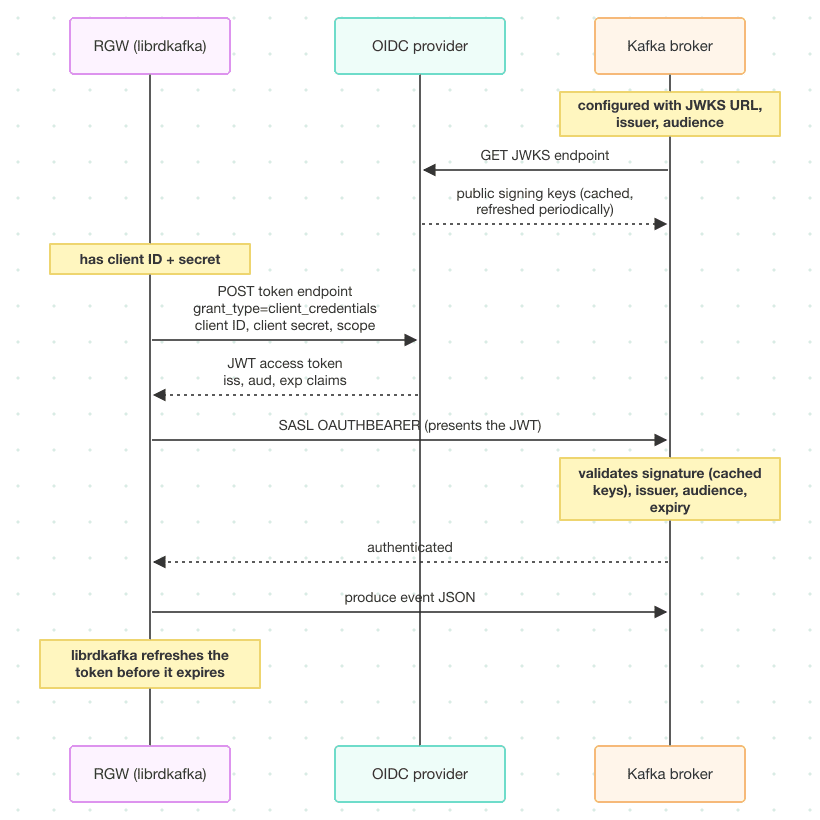
The broker never sees the client secret: it only sees a signed, short-lived token.
What you need from your identity provider 
- A client registered for the
client_credentialsgrant, and its client ID and secret. - The token endpoint URL, which RGW is configured with.
- The JWKS endpoint URL, plus the expected issuer and audience, which the broker is configured with.
The provider's discovery document lists the issuer, the token endpoint, and the JWKS URI. The client ID and secret come from registering the client, and the audience depends on the provider; it is often the client ID.
curl -s https://idp.example.com/.well-known/openid-configuration | python3 -m json.tool
Any OIDC provider that supports the client_credentials grant should work. The examples below use https://idp.example.com as the issuer, https://idp.example.com/token as the token endpoint, https://idp.example.com/keys as the JWKS endpoint, and rgw-notifications as the client ID and audience. Substitute the values from your provider's discovery document.
Setting up a test provider 
Skip this if you already have an identity provider. For a test environment, Dex is a single-binary OIDC provider that supports the client_credentials grant beginning with Dex v2.46.0. Install it following the Dex documentation, then configure it. Listing client_credentials under oauth2.grantTypes is what enables the grant:
issuer: http://idp.example.com:5556/dex

storage:
  type: memory

web:
  http: 0.0.0.0:5556

oauth2:
  grantTypes:
    - client_credentials
    - authorization_code
  skipApprovalScreen: true

staticClients:
  - id: rgw-notifications
    secret: client-secret
    name: RGW Notifications

enablePasswordDB: false

connectors:
  - type: mockCallback
    id: mock
    name: Mock
dex serve /etc/dex/config.yaml
Note: the
issuervalue must match theexpected.issuerconfigured on the broker exactly. A trailing slash, orhttpwhere the broker expectshttps, causes token validation to fail.
Confirm the discovery document reports the issuer, token endpoint, and JWKS URI you expect:
curl -s http://idp.example.com:5556/dex/.well-known/openid-configuration \
  | python3 -m json.tool
With this configuration, Dex's issuer is http://idp.example.com:5556/dex, its token endpoint is http://idp.example.com:5556/dex/token, and its JWKS endpoint is http://idp.example.com:5556/dex/keys. Use those in place of the https://idp.example.com values in the rest of this section. Over plain HTTP the client secret reaches Dex in the clear, so keep this to a test environment.
Broker configuration 
Add OAUTHBEARER to the enabled mechanisms and configure the token validator on both listeners:
# Add OAUTHBEARER to the enabled mechanisms
sasl.enabled.mechanisms=PLAIN,SCRAM-SHA-256,SCRAM-SHA-512,GSSAPI,OAUTHBEARER

# ── SASL_SSL listener (port 9094) ──────────────────────────────────────────
listener.name.sasl_ssl.oauthbearer.sasl.jaas.config=\
  org.apache.kafka.common.security.oauthbearer.OAuthBearerLoginModule required;
listener.name.sasl_ssl.oauthbearer.sasl.server.callback.handler.class=\
  org.apache.kafka.common.security.oauthbearer.OAuthBearerValidatorCallbackHandler
listener.name.sasl_ssl.oauthbearer.sasl.oauthbearer.jwks.endpoint.url=\
  https://idp.example.com/keys
listener.name.sasl_ssl.oauthbearer.sasl.oauthbearer.expected.audience=\
  rgw-notifications
listener.name.sasl_ssl.oauthbearer.sasl.oauthbearer.expected.issuer=\
  https://idp.example.com

# ── SASL_PLAINTEXT listener (port 9095) ────────────────────────────────────
listener.name.sasl_plaintext.oauthbearer.sasl.jaas.config=\
  org.apache.kafka.common.security.oauthbearer.OAuthBearerLoginModule required;
listener.name.sasl_plaintext.oauthbearer.sasl.server.callback.handler.class=\
  org.apache.kafka.common.security.oauthbearer.OAuthBearerValidatorCallbackHandler
listener.name.sasl_plaintext.oauthbearer.sasl.oauthbearer.jwks.endpoint.url=\
  https://idp.example.com/keys
listener.name.sasl_plaintext.oauthbearer.sasl.oauthbearer.expected.audience=\
  rgw-notifications
listener.name.sasl_plaintext.oauthbearer.sasl.oauthbearer.expected.issuer=\
  https://idp.example.com
Note: these class names work on Kafka 3.9 and 4.x, the broker versions Ceph supports. Older examples use the same classes in the
org.apache.kafka.common.security.oauthbearer.securedpackage, which Kafka 4.0 removed. The broker needs only the server-side validator; no client login handler is configured on the broker itself.
Kafka 4.0 and later also refuse to contact a JWKS or token endpoint that isn't listed in the org.apache.kafka.sasl.oauthbearer.allowed.urls JVM system property, which is empty by default. Add the JWKS URL to the broker's KAFKA_OPTS, next to the JAAS file from the GSSAPI section:
export KAFKA_OPTS="-Djava.security.auth.login.config=${KAFKA_HOME}/config/kafka_server_jaas.conf \
  -Dorg.apache.kafka.sasl.oauthbearer.allowed.urls=https://idp.example.com/keys"

kafka-server-start.sh ${KAFKA_HOME}/config/server.properties
The validator logs nothing when it starts cleanly; the CLI check below exercises it.
OAuthBearer over SASL_SSL 
Use SASL_SSL for OAuthBearer. The JWT is signed, so it cannot be forged, but it is a bearer token: anyone who reads it off the wire can use it until it expires. TLS is what prevents that.
The Kafka CLI can fetch its own token, given the same client credentials. The Java client takes the client ID, secret, and scope as options of the login module, and its JVM needs the token endpoint in allowed.urls:
cat > /tmp/oauthbearer-ssl-client.properties <<'EOF'
security.protocol=SASL_SSL
sasl.mechanism=OAUTHBEARER
sasl.jaas.config=org.apache.kafka.common.security.oauthbearer.OAuthBearerLoginModule required \
  clientId="rgw-notifications" \
  clientSecret="client-secret" \
  scope="openid";
sasl.login.callback.handler.class=org.apache.kafka.common.security.oauthbearer.OAuthBearerLoginCallbackHandler
sasl.oauthbearer.token.endpoint.url=https://idp.example.com/token
ssl.truststore.location=/etc/kafka/ssl/server.truststore.jks
ssl.truststore.password=mypassword
EOF

export KAFKA_OPTS="-Dorg.apache.kafka.sasl.oauthbearer.allowed.urls=https://idp.example.com/token"

kafka-topics.sh \
  --bootstrap-server broker.example.com:9094 \
  --command-config /tmp/oauthbearer-ssl-client.properties \
  --create \
  --topic oauthbearer-ssl-notifications \
  --partitions 1 \
  --replication-factor 1
If topic creation fails, request a token directly and inspect its claims. This distinguishes a provider or client configuration problem from a broker one:
ACCESS_TOKEN=$(curl -s -X POST https://idp.example.com/token \
  -H "Content-Type: application/x-www-form-urlencoded" \
  -d "grant_type=client_credentials&client_id=rgw-notifications&client_secret=client-secret&scope=openid" \
  | python3 -c "import json,sys; print(json.load(sys.stdin)['access_token'])")

# The iss and aud claims must match expected.issuer and expected.audience.
# JWT segments are base64url without padding, which base64 -d can't decode reliably.
echo "$ACCESS_TOKEN" | python3 -c '
import base64, json, sys
p = sys.stdin.read().split(".")[1]
print(json.dumps(json.loads(base64.urlsafe_b64decode(p + "=" * (-len(p) % 4))), indent=2))'
The RGW topic carries the OIDC client identity rather than a token, because librdkafka fetches and refreshes tokens itself:
aws --endpoint-url $RGW sns create-topic \
  --name oauthbearer-ssl-notifications \
  --attributes '{
    "push-endpoint": "kafka://broker.example.com:9094",
    "kafka-ack-level": "broker",
    "use-ssl": "true",
    "ca-location": "/etc/ceph/y-ca.crt",
    "mechanism": "OAUTHBEARER",
    "sasl-oauthbearer-token-endpoint-url": "https://idp.example.com/token",
    "sasl-oauthbearer-client-id": "rgw-notifications",
    "sasl-oauthbearer-client-secret": "client-secret",
    "sasl-oauthbearer-scope": "openid"
  }'
Attach it to a bucket named oauthbearer-ssl-bucket in the same way.
| Attribute | Value | Description |
|---|---|---|
mechanism | OAUTHBEARER | Selects SASL/OAUTHBEARER |
use-ssl | true | Encrypt the channel with TLS |
ca-location | path to the CA cert | CA used to verify the broker certificate |
sasl-oauthbearer-token-endpoint-url | OIDC token endpoint | Where librdkafka requests a JWT |
sasl-oauthbearer-client-id | OAuth 2.0 client ID | Registered with the identity provider |
sasl-oauthbearer-client-secret | OAuth 2.0 client secret | Used in the client_credentials grant |
sasl-oauthbearer-scope | openid | Optional; include if your provider needs it |
Note the spelling: these are RGW topic attributes, hyphenated, not the dotted librdkafka keys they eventually map onto.
Note:
sasl-oauthbearer-client-secretis handled as a notification secret. It is not written to the RGW log, and submitting it over a cleartext connection to RGW requiresrgw_allow_notification_secrets_in_cleartext, as in Part 1.
Trigger an event:
# Consumer terminal: needs the same KAFKA_OPTS as kafka-topics.sh above
export KAFKA_OPTS="-Dorg.apache.kafka.sasl.oauthbearer.allowed.urls=https://idp.example.com/token"
kafka-console-consumer.sh \
  --bootstrap-server broker.example.com:9094 \
  --consumer.config /tmp/oauthbearer-ssl-client.properties \
  --topic oauthbearer-ssl-notifications \
  --from-beginning

# elsewhere
echo "hello oauthbearer" > /tmp/oauthbearer-test.txt
aws --endpoint-url $RGW s3 cp /tmp/oauthbearer-test.txt \
  s3://oauthbearer-ssl-bucket/oauthbearer-test.txt
With debug_rgw_notification at 20 (see the GSSAPI section), the RGW log records the mechanism and the connection when RGW opens it:
cephadm logs --name rgw.<id> | grep "Kafka connect:"
Kafka connect: successfully configured OAUTHBEARER/OIDC
Kafka connect: new connection is created: broker.example.com:9094 ...
If the broker rejects the token, both the CLI and RGW fail to connect, and decoding the token as shown above usually shows which claim doesn't match.
OAuthBearer over SASL_PLAINTEXT 
This sends the JWT to the broker over an unencrypted connection. The client_credentials exchange with the identity provider is unaffected, since that runs against the provider's own URL, but a token observed in transit on the Kafka connection can be replayed until it expires. This configuration is for development only.
It requires the same cluster setting as the SASL_PLAINTEXT sections in Part 1:
ceph config set client.rgw rgw_allow_notification_secrets_in_cleartext true
The topic differs from the SASL_SSL version only in the port and in use-ssl:
aws --endpoint-url $RGW sns create-topic \
  --name oauthbearer-plaintext-notifications \
  --attributes '{
    "push-endpoint": "kafka://broker.example.com:9095",
    "kafka-ack-level": "broker",
    "use-ssl": "false",
    "mechanism": "OAUTHBEARER",
    "sasl-oauthbearer-token-endpoint-url": "https://idp.example.com/token",
    "sasl-oauthbearer-client-id": "rgw-notifications",
    "sasl-oauthbearer-client-secret": "client-secret",
    "sasl-oauthbearer-scope": "openid"
  }'
Create the Kafka topic oauthbearer-plaintext-notifications against port 9095 first, then attach the notification and verify delivery as above.
With OAuthBearer, librdkafka owns the token lifecycle. RGW supplies the client identity once, at topic creation; fetching and refreshing tokens needs no further involvement from RGW. As with GSSAPI, RGW's connection cache is keyed on the connection settings, here including the token endpoint, client ID, secret, and scope, so topics with different client identities don't share a producer connection.
Together with Part 1, that covers the SASL mechanisms RGW offers for bucket notifications: PLAIN, SCRAM, GSSAPI, and OAuthBearer. PLAIN and SCRAM run over any of the three connections: plaintext, TLS, and mTLS. GSSAPI runs over the first two, for the reason in the note near the top of this post.
The tests live in src/test/rgw/bucket_notification/, under the kafka_security_test marker. test_notification_kafka_security_sasl_gssapi and test_notification_kafka_security_ssl_sasl_gssapi cover the two GSSAPI configurations above; both skip unless the [kerberos] section of the test configuration names a service, principal and keytab, so a run that reports them as skipped has not exercised GSSAPI at all. The OAuthBearer tests are part of ceph/ceph#70100, not yet merged as of this writing, and skip in the same way, on an [oauthbearer] section.