Kafka Security for Bucket Notifications in Ceph RGW, Part 1: SASL, TLS, and mTLS
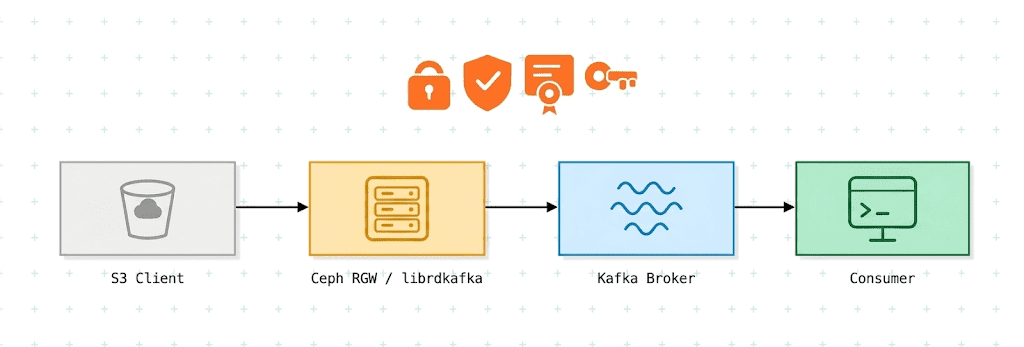
Securing a Kafka connection is not one decision. It is two independent ones, and most of the confusion around Kafka security comes from treating them as a single scale.
The first is the connection between RGW and the broker: whether it is encrypted, and which of the two endpoints proves its identity. TLS encrypts the traffic and authenticates the broker to RGW: RGW verifies the broker's certificate against a CA. Mutual TLS adds the other direction: RGW presents a client certificate, and the broker derives an SSL user name from it. Neither carries a SASL user identity.
The second is user authentication, and that is SASL's job. PLAIN sends a username and password. SCRAM-SHA-256 and SCRAM-SHA-512 prove knowledge of the same password without putting it on the wire. Part 2 covers GSSAPI (Kerberos) and OAUTHBEARER (OIDC), which delegate the same question to a KDC or an OIDC provider.
The two layers are orthogonal. A SASL mechanism runs over a plaintext connection or a TLS connection without changing; only what carries it changes. Kafka's protocol names (PLAINTEXT, SSL, SASL_PLAINTEXT, SASL_SSL) are just the combinations. RGW supports all of them, selected entirely through SNS topic attributes.
This post documents the configuration for each combination. Kafka's own documentation explains listeners and JAAS, and the RGW bucket notification documentation lists topic attributes. What follows connects the dots between the two, since a secured notification pipeline needs both sides configured consistently.
Part 1 covers plaintext connections, TLS, mTLS, and SASL (PLAIN and SCRAM) over plaintext and TLS connections. SASL combined with mTLS is not covered or tested. Part 2 covers GSSAPI (Kerberos) and OAuthBearer, which as of this writing are not yet in a Ceph release.
How RGW connects to Kafka 
The short version: securing the connection is a change to the SNS topic, not to the bucket. Nothing in the bucket notification configuration changes in any section below.
Kafka delivery is configured entirely on the SNS topic. push-endpoint holds the broker URL, and every security attribute described below sits alongside it on the same topic. The bucket refers to that topic by ARN and knows nothing about how RGW reaches the broker.

Internally RGW uses librdkafka, and the security-related SNS topic attributes map more or less directly onto librdkafka configuration keys. That is why every mechanism below is expressed as a different set of attributes on sns create-topic, and why the bucket side stays untouched.
The attributes fall into the two groups described above. First, the connection between RGW and the broker:
| Connection | Encrypted | Endpoint authentication | RGW topic attributes |
|---|---|---|---|
| Plaintext TCP | No | None | None |
| TLS | Yes | RGW verifies the broker's certificate | use-ssl, ca-location, verify-ssl |
| mTLS | Yes | ...and the broker verifies RGW's client certificate | the above, plus ssl-certificate-location, ssl-key-location |
Second, the SASL mechanism, which is what tells the broker which user is publishing:
| SASL mechanism | What the broker learns | RGW topic attributes |
|---|---|---|
| none | No SASL user (mTLS still yields an SSL user name) | None |
PLAIN | The user, from a username and password sent as-is | user-name, password |
SCRAM-SHA-256, -SHA-512 | The same user, proven without sending the password | user-name, password, mechanism |
GSSAPI, OAUTHBEARER | The same user, via a KDC or an OIDC provider (Part 2) | see Part 2 |
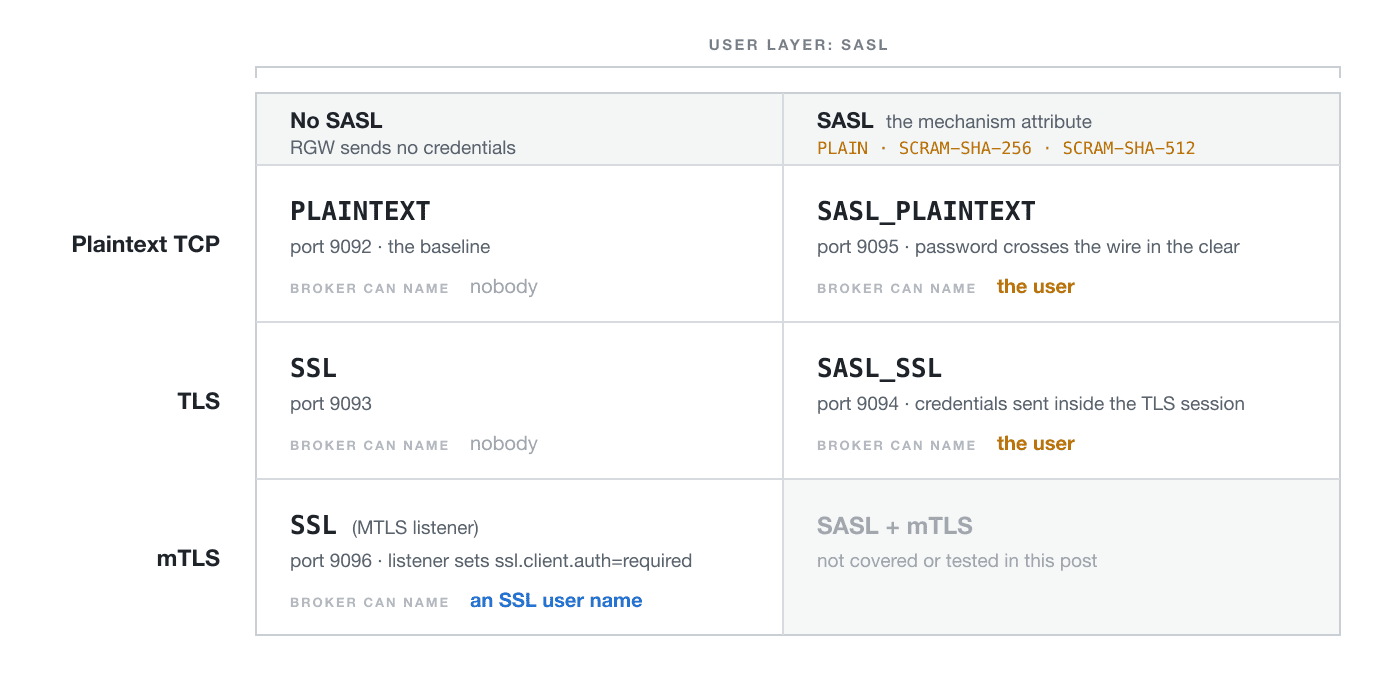
A broker can expose all of these listeners at once, which is how the automated tests are configured and a convenient way to work through them. Switching a bucket from one combination to another then costs one sns create-topic call rather than a broker restart.
Before you start 
The examples assume:
- A running Kafka cluster whose broker configuration you can edit, with the Kafka CLI tools (
kafka-topics.sh,kafka-console-consumer.sh,kafka-configs.sh) on yourPATH. Substitutebroker.example.comwith your broker's hostname. - A running Ceph cluster with at least one RGW, and S3 credentials for a user allowed to create SNS topics.
$RGWbelow is the RGW endpoint, for exampleexport RGW=https://rgw.example.com. TheawsCLI also needs a region; setexport AWS_DEFAULT_REGION=defaultto match the boto3 example below. - A Ceph release that has the attributes you plan to use. The mTLS attributes (
ssl-certificate-location,ssl-key-location,ssl-key-password) first appear in Tentacle 20.2.3.verify-ssltakes effect for Kafka beginning with Umbrella; Tentacle ignores it and always verifies the broker's certificate. The notifications documentation lists Kafka 3.9 and 4.x as the supported broker versions. - For any SASL topic whose credentials travel unencrypted on either leg:
ceph config set client.rgw rgw_allow_notification_secrets_in_cleartext true. Without it RGW refuses to accept a topic carrying credentials over a non-HTTPS S3 request (even a SASL_SSL topic), and refuses to send those credentials over a non-TLS Kafka connection.ssl-key-passwordcounts as a credential here too. Leave the setting off in production: use HTTPS for the S3 endpoint and SASL over TLS for Kafka instead.
The two calls 
Every section below makes the same two API calls, and only the first one changes:
CreateTopicon the SNS endpoint, with the security configuration passed as the topic's attribute map. This is where all the work in this post happens.PutBucketNotificationConfigurationon the S3 endpoint, pointing a bucket at the ARN that call returned. This is identical in every section.
Neither is specific to the AWS CLI. In boto3, which is what the upstream test suite uses, the pair looks like this:
import boto3

sns = boto3.client(
    "sns",
    endpoint_url=RGW_ENDPOINT,
    aws_access_key_id=ACCESS_KEY,
    aws_secret_access_key=SECRET_KEY,
    region_name="default",
)

topic_arn = sns.create_topic(
    Name="ssl-notifications",
    Attributes={
        "push-endpoint": "kafka://broker.example.com:9093",
        "kafka-ack-level": "broker",
        "use-ssl": "true",
        "ca-location": "/etc/ceph/y-ca.crt",
    },
)["TopicArn"]

s3 = boto3.client(
    "s3",
    endpoint_url=RGW_ENDPOINT,
    aws_access_key_id=ACCESS_KEY,
    aws_secret_access_key=SECRET_KEY,
    region_name="default",
)

s3.put_bucket_notification_configuration(
    Bucket="ssl-bucket",
    NotificationConfiguration={
        "TopicConfigurations": [
            {
                "Id": "ssl-notif",
                "TopicArn": topic_arn,
                "Events": ["s3:ObjectCreated:*"],
            }
        ]
    },
)
The Java and Go SDKs expose the same two calls with the same shape (an attribute map on CreateTopic, then PutBucketNotificationConfiguration), and the attribute names are identical in all of them, because they are RGW's names, not the client's. Whatever you publish from, the only thing that changes between the sections below is the contents of that map.
The rest of this post writes that map out with aws sns create-topic, because it puts the attributes on the page in the fewest lines. Read those blocks as the attribute map, not as a recommendation to shell out.
Certificates 
The TLS sections (TLS, SASL over TLS, mTLS) need three things: a CA certificate, a server certificate and key for the broker, and (for mTLS) a client certificate and key for RGW. If you already issue certificates from an internal CA, use those; the only requirement specific to this setup is that the broker certificate's SAN matches the hostname or IP address that RGW connects to.
The files referenced below are:
| File | Used by | Purpose |
|---|---|---|
y-ca.crt | RGW | The CA certificate RGW checks the broker's certificate against (ca-location) |
server.keystore.jks | Broker | Broker private key and signed certificate |
server.truststore.jks | Broker | The CA certificate the broker checks RGW's client certificate against (mTLS) |
client.crt | RGW | Client certificate (ssl-certificate-location) |
client.key | RGW | Client private key (ssl-key-location) |
Here one CA signs both certificates, so server.truststore.jks holds the same CA as y-ca.crt; the Kafka CLI examples below reuse it as their truststore for verifying the broker.
The CA certificate and the client key pair must be readable by the radosgw process on every host running an RGW, and the private key should be no more readable than that, 0600 owned by the RGW user or 0640 with a shared group. For a throwaway test environment, the Ceph source tree ships src/test/rgw/bucket_notification/kafka-security.sh, which generates all five files with the password mypassword. It needs openssl and Java's keytool, writes the files to the current directory (replacing any files with the same names), and leaves client.key at mode 0644, so tighten that afterward. The broker certificate's SAN defaults to localhost; set KAFKA_CERT_HOSTNAME to match the examples in this post (and KAFKA_CERT_IP to add an IP SAN, if you connect by address):
KAFKA_CERT_HOSTNAME=broker.example.com ./kafka-security.sh
chmod 600 client.key
The examples below expect the .jks files in /etc/kafka/ssl on the broker, and y-ca.crt, client.crt, and client.key in /etc/ceph on every RGW host.
Under cephadm, RGW runs in a container, and the paths in the topic attributes are resolved inside it. cephadm doesn't mount /etc/ceph from the host, so add the files to the RGW service specification with extra_container_args:
service_type: rgw
service_id: default
placement:
  label: rgw
extra_container_args:
  - "-v"
  - "/etc/ceph/y-ca.crt:/etc/ceph/y-ca.crt:ro"
  - "-v"
  - "/etc/ceph/client.crt:/etc/ceph/client.crt:ro"
  - "-v"
  - "/etc/ceph/client.key:/etc/ceph/client.key:ro"
Apply it with ceph orch apply -i rgw.yaml, then restart the RGW daemons with ceph orch redeploy rgw.default so that the new mounts take effect. Inside the container, RGW runs as the ceph user (UID 167), so that is the user that needs to be able to read the key.
Broker configuration 
Enable all five listeners together by merging the following into your existing server.properties. On a KRaft broker, keep the controller listener in listeners and listener.security.protocol.map, on a port outside 9092-9096, as the upstream test README describes:
# ── Listeners ───────────────────────────────────────────────────────────────
listeners=PLAINTEXT://broker.example.com:9092,SSL://broker.example.com:9093,SASL_SSL://broker.example.com:9094,SASL_PLAINTEXT://broker.example.com:9095,MTLS://broker.example.com:9096
advertised.listeners=PLAINTEXT://broker.example.com:9092,SSL://broker.example.com:9093,SASL_SSL://broker.example.com:9094,SASL_PLAINTEXT://broker.example.com:9095,MTLS://broker.example.com:9096
listener.security.protocol.map=PLAINTEXT:PLAINTEXT,SSL:SSL,SASL_SSL:SASL_SSL,SASL_PLAINTEXT:SASL_PLAINTEXT,MTLS:SSL

inter.broker.listener.name=PLAINTEXT

# ── SSL, shared by the SSL / SASL_SSL / MTLS listeners ──────────────────────
ssl.keystore.location=/etc/kafka/ssl/server.keystore.jks
ssl.keystore.password=mypassword
ssl.key.password=mypassword
ssl.truststore.location=/etc/kafka/ssl/server.truststore.jks
ssl.truststore.password=mypassword

# SSL listener: plain TLS, client certificate optional
ssl.client.auth=requested

# MTLS listener: client certificate mandatory
listener.name.mtls.ssl.client.auth=required
listener.name.mtls.ssl.keystore.location=/etc/kafka/ssl/server.keystore.jks
listener.name.mtls.ssl.keystore.password=mypassword
listener.name.mtls.ssl.key.password=mypassword
listener.name.mtls.ssl.truststore.location=/etc/kafka/ssl/server.truststore.jks
listener.name.mtls.ssl.truststore.password=mypassword

# ── SASL mechanisms ─────────────────────────────────────────────────────────
sasl.enabled.mechanisms=PLAIN,SCRAM-SHA-256,SCRAM-SHA-512
sasl.mechanism.inter.broker.protocol=PLAIN

listener.name.sasl_ssl.plain.sasl.jaas.config=org.apache.kafka.common.security.plain.PlainLoginModule required \
  username="admin" \
  password="admin-secret" \
  user_alice="alice-secret";

listener.name.sasl_plaintext.plain.sasl.jaas.config=org.apache.kafka.common.security.plain.PlainLoginModule required \
  username="admin" \
  password="admin-secret" \
  user_alice="alice-secret";

# SCRAM users live in Kafka's metadata store, not here; see the SCRAM section
listener.name.sasl_plaintext.scram-sha-256.sasl.jaas.config=org.apache.kafka.common.security.scram.ScramLoginModule required;
listener.name.sasl_plaintext.scram-sha-512.sasl.jaas.config=org.apache.kafka.common.security.scram.ScramLoginModule required;
listener.name.sasl_ssl.scram-sha-256.sasl.jaas.config=org.apache.kafka.common.security.scram.ScramLoginModule required;
listener.name.sasl_ssl.scram-sha-512.sasl.jaas.config=org.apache.kafka.common.security.scram.ScramLoginModule required;
Note:
listenersshould match, or contain,advertised.listeners, and the advertised address must be resolvable and reachable by clients. Otherwise the broker cannot connect to itself during startup, and the resulting stack trace does not obviously point at the cause. On a single host, use the same name in both.
Restart the broker after editing server.properties.
Plaintext: establish a baseline 
No authentication, no encryption. The only question this answers is whether an object upload reaches Kafka at all. Once it does, every mechanism below is an incremental change to the same pipeline.
Create the Kafka topic:
kafka-topics.sh \
  --bootstrap-server broker.example.com:9092 \
  --create \
  --topic plaintext-notifications \
  --partitions 1 \
  --replication-factor 1
Then create the SNS topic. push-endpoint is the broker, and kafka-ack-level selects the delivery guarantee (none or broker). Use broker to wait for an actual ack from the broker:
aws --endpoint-url $RGW sns create-topic \
  --name plaintext-notifications \
  --attributes '{"push-endpoint":"kafka://broker.example.com:9092","kafka-ack-level":"broker"}'
{
  "TopicArn": "arn:aws:sns:default::plaintext-notifications"
}
An SNS topic on its own does nothing until a bucket points at it:
aws --endpoint-url $RGW s3 mb s3://test-bucket

aws --endpoint-url $RGW s3api put-bucket-notification-configuration \
  --bucket test-bucket \
  --notification-configuration '{
    "TopicConfigurations": [{
      "Id": "plaintext-notif",
      "TopicArn": "arn:aws:sns:default::plaintext-notifications",
      "Events": ["s3:ObjectCreated:*"]
    }]
  }'
Start a consumer in one terminal:
kafka-console-consumer.sh \
  --bootstrap-server broker.example.com:9092 \
  --topic plaintext-notifications \
  --from-beginning
Upload an object in another:
echo "hello kafka" > /tmp/test.txt
aws --endpoint-url $RGW s3 cp /tmp/test.txt s3://test-bucket/test.txt
Within about a second the consumer prints the event (abbreviated here):
{
  "Records": [
    {
      "eventName": "ObjectCreated:Put",
      "s3": {
        "bucket": { "name": "test-bucket" },
        "object": { "key": "test.txt" }
      }
    }
  ]
}
That is the pipeline end to end, with no security. Everything from here changes only how RGW connects to the broker.
SASL/PLAIN over a plaintext connection: identify the user 
Kafka now requires a username and password before it accepts anything. What that adds is a user identity: the broker knows the events were published by alice and can authorize them accordingly. It says nothing about the host RGW runs on, and nothing about confidentiality: the connection is still plaintext, so both the password and the events travel in the clear. This belongs on a trusted internal network, and only there; the same mechanism over TLS is a section further down.
Because the password crosses a non-TLS Kafka connection, this section and the next need rgw_allow_notification_secrets_in_cleartext set to true (see Before you start). Without it, a topic created over an HTTPS S3 endpoint still succeeds, but RGW never connects to the broker, and the RGW log shows Kafka connect: user/password are only allowed over secure connection.
The Kafka CLI needs matching credentials. The broker JAAS configuration above provides user alice with password alice-secret:
cat > /tmp/sasl-client.properties <<'EOF'
security.protocol=SASL_PLAINTEXT
sasl.mechanism=PLAIN
sasl.jaas.config=org.apache.kafka.common.security.plain.PlainLoginModule required \
  username="alice" \
  password="alice-secret";
EOF

kafka-topics.sh \
  --bootstrap-server broker.example.com:9095 \
  --command-config /tmp/sasl-client.properties \
  --create \
  --topic sasl-plaintext-notifications \
  --partitions 1 \
  --replication-factor 1
On the RGW side, two new attributes carry the credentials: user-name and password. A third, mechanism, defaults to PLAIN and becomes relevant in the next section:
aws --endpoint-url $RGW sns create-topic \
  --name sasl-plaintext-notifications \
  --attributes '{
    "push-endpoint": "kafka://broker.example.com:9095",
    "kafka-ack-level": "broker",
    "user-name": "alice",
    "password": "alice-secret"
  }'
Point a bucket at it exactly as in the plaintext section: create sasl-bucket and send the same notification configuration with TopicArn set to arn:aws:sns:default::sasl-plaintext-notifications.
Verify the same way, with the client configuration added:
kafka-console-consumer.sh \
  --bootstrap-server broker.example.com:9095 \
  --consumer.config /tmp/sasl-client.properties \
  --topic sasl-plaintext-notifications \
  --from-beginning

# elsewhere
echo "hello sasl" > /tmp/sasl-test.txt
aws --endpoint-url $RGW s3 cp /tmp/sasl-test.txt s3://sasl-bucket/sasl-test.txt
Note what did not change: the bucket notification configuration is identical to the plaintext section. Only the topic attributes moved. That holds for every remaining section.
SCRAM: the same user, without sending the password 
PLAIN transmits the password verbatim. SCRAM (Salted Challenge Response Authentication Mechanism) addresses that specific problem: both sides exchange salted proofs derived from the password, and the password itself never appears on the wire. It identifies exactly the same thing PLAIN identifies (the user), and it is equally indifferent to what carries it, working over a plaintext connection or TLS without change.
The operational difference is where the credentials live. PLAIN users are declared in the broker's JAAS configuration; SCRAM users are registered in Kafka's metadata store (ZooKeeper or KRaft on Kafka 3.x, KRaft on 4.x) with kafka-configs.sh, while the broker is running:
kafka-configs.sh \
  --bootstrap-server broker.example.com:9092 \
  --entity-type users --entity-name alice --alter \
  --add-config 'SCRAM-SHA-256=[password=alice-secret]'

# Register SHA-512 for the same user too, if you want both
kafka-configs.sh \
  --bootstrap-server broker.example.com:9092 \
  --entity-type users --entity-name alice --alter \
  --add-config 'SCRAM-SHA-512=[password=alice-secret]'
Check that it took effect:
kafka-configs.sh \
  --bootstrap-server broker.example.com:9092 \
  --entity-type users --entity-name alice --describe
SCRAM credential configs for user-principal 'alice' are SCRAM-SHA-256=iterations=4096, SCRAM-SHA-512=iterations=4096
No broker restart is needed: the credentials take effect immediately. To create SCRAM credentials before a KRaft broker first starts, pass them to kafka-storage.sh format with --add-scram instead.
The client configuration swaps in the SCRAM login module:
cat > /tmp/scram-client.properties <<'EOF'
security.protocol=SASL_PLAINTEXT
sasl.mechanism=SCRAM-SHA-256
sasl.jaas.config=org.apache.kafka.common.security.scram.ScramLoginModule required \
  username="alice" \
  password="alice-secret";
EOF

kafka-topics.sh \
  --bootstrap-server broker.example.com:9095 \
  --command-config /tmp/scram-client.properties \
  --create \
  --topic scram-notifications \
  --partitions 1 \
  --replication-factor 1
On the RGW side the only change from the PLAIN topic is one attribute:
aws --endpoint-url $RGW sns create-topic \
  --name scram-notifications \
  --attributes '{
    "push-endpoint": "kafka://broker.example.com:9095",
    "kafka-ack-level": "broker",
    "user-name": "alice",
    "password": "alice-secret",
    "mechanism": "SCRAM-SHA-256"
  }'
Attach it to a bucket named scram-bucket in the same way.
mechanism accepts SCRAM-SHA-256 or SCRAM-SHA-512, and it must match a credential that has actually been registered: requesting SHA-512 when only SHA-256 was added fails at handshake time.
kafka-console-consumer.sh \
  --bootstrap-server broker.example.com:9095 \
  --consumer.config /tmp/scram-client.properties \
  --topic scram-notifications \
  --from-beginning

# elsewhere
echo "hello scram" > /tmp/scram-test.txt
aws --endpoint-url $RGW s3 cp /tmp/scram-test.txt s3://scram-bucket/scram-test.txt
SCRAM is preferable to PLAIN on any network, and it is indifferent to what carries it; see the SASL over TLS section below.
TLS: encrypt the connection and authenticate the broker 
Kafka calls this listener SSL, and it does two things: it encrypts the traffic between RGW and the broker, and it authenticates the broker to RGW. The broker presents its certificate, RGW verifies it against the CA, and the event stream is no longer readable on the wire.
It is one-way authentication. The broker has proved which server it is; RGW has proved nothing. use-ssl does not involve SASL at all, so on this listener the broker accepts events without knowing who sent them.
Build a TLS client configuration and create the topic:
cat > /tmp/ssl-client.properties <<'EOF'
security.protocol=SSL
ssl.truststore.location=/etc/kafka/ssl/server.truststore.jks
ssl.truststore.password=mypassword
EOF

kafka-topics.sh \
  --bootstrap-server broker.example.com:9093 \
  --command-config /tmp/ssl-client.properties \
  --create \
  --topic ssl-notifications \
  --partitions 1 \
  --replication-factor 1
Three new RGW attributes: use-ssl turns TLS on, ca-location points at the CA that signed the broker certificate, and verify-ssl (librdkafka's enable.ssl.certificate.verification) controls whether RGW checks that certificate at all. Tentacle ignores verify-ssl and always checks it.
aws --endpoint-url $RGW sns create-topic \
  --name ssl-notifications \
  --attributes '{
    "push-endpoint": "kafka://broker.example.com:9093",
    "kafka-ack-level": "broker",
    "use-ssl": "true",
    "ca-location": "/etc/ceph/y-ca.crt",
    "verify-ssl": "true"
  }'
Attach it to a bucket named ssl-bucket in the same way.
Note:
verify-ssl: falseexists for development, where the certificate SAN does not match the address being connected to. It gives up the authentication half of this section: the traffic is still encrypted, but to whoever answers the port, which is not the same as encrypted to your broker.
kafka-console-consumer.sh \
  --bootstrap-server broker.example.com:9093 \
  --consumer.config /tmp/ssl-client.properties \
  --topic ssl-notifications \
  --from-beginning

# elsewhere
echo "hello ssl" > /tmp/ssl-test.txt
aws --endpoint-url $RGW s3 cp /tmp/ssl-test.txt s3://ssl-bucket/ssl-test.txt
The RGW log records the connection settings when RGW opens a connection to the broker. At the default log level it shows one line per connection, such as Kafka connect: broker=broker.example.com:9093 use_ssl=1 user= .... The Kafka connect: successfully configured ... lines, which are the authoritative answer on whether TLS was configured or silently skipped, are logged at level 20 of the rgw_notification subsystem, so raise that level temporarily:
ceph config set client.rgw debug_rgw_notification 20
cephadm logs --name rgw.<id> | grep "Kafka connect:"
These lines appear only when RGW opens a new connection. RGW reuses an open connection and closes it after rgw_kafka_connection_idle seconds without traffic (300 by default), so a new topic with different settings, or an upload after that idle period, shows them.
SASL over TLS: a user identity on an authenticated connection 
This is the first section that uses both layers at once, and it is nothing more than the attributes of the two previous sections together. The connection is established and the broker authenticated first; the SASL exchange then runs inside it, unchanged from the plaintext case. Whenever user authentication is username-and-password based, this is the production choice.
The client configuration is the SSL one plus the SASL lines:
cat > /tmp/sasl-ssl-client.properties <<'EOF'
security.protocol=SASL_SSL
sasl.mechanism=PLAIN
sasl.jaas.config=org.apache.kafka.common.security.plain.PlainLoginModule required \
  username="alice" \
  password="alice-secret";
ssl.truststore.location=/etc/kafka/ssl/server.truststore.jks
ssl.truststore.password=mypassword
EOF

kafka-topics.sh \
  --bootstrap-server broker.example.com:9094 \
  --command-config /tmp/sasl-ssl-client.properties \
  --create \
  --topic sasl-ssl-notifications \
  --partitions 1 \
  --replication-factor 1
The RGW topic is the union of the attributes from the two previous sections:
aws --endpoint-url $RGW sns create-topic \
  --name sasl-ssl-notifications \
  --attributes '{
    "push-endpoint": "kafka://broker.example.com:9094",
    "kafka-ack-level": "broker",
    "use-ssl": "true",
    "ca-location": "/etc/ceph/y-ca.crt",
    "user-name": "alice",
    "password": "alice-secret",
    "mechanism": "PLAIN"
  }'
Attach it to a bucket named sasl-ssl-bucket in the same way.
For SCRAM over TLS, change mechanism to SCRAM-SHA-256 and, in the client properties, swap sasl.mechanism and the login module class as in the SCRAM section. That is the entire difference:
aws --endpoint-url $RGW sns create-topic \
  --name scram-ssl-notifications \
  --attributes '{
    "push-endpoint": "kafka://broker.example.com:9094",
    "kafka-ack-level": "broker",
    "use-ssl": "true",
    "ca-location": "/etc/ceph/y-ca.crt",
    "user-name": "alice",
    "password": "alice-secret",
    "mechanism": "SCRAM-SHA-256"
  }'
Verify as before:
kafka-console-consumer.sh \
  --bootstrap-server broker.example.com:9094 \
  --consumer.config /tmp/sasl-ssl-client.properties \
  --topic sasl-ssl-notifications \
  --from-beginning

# elsewhere
echo "hello sasl ssl" > /tmp/sasl-ssl-test.txt
aws --endpoint-url $RGW s3 cp /tmp/sasl-ssl-test.txt s3://sasl-ssl-bucket/sasl-ssl-test.txt
TLS is established before the SASL exchange, so the credentials themselves are protected in transit, which is what SASL_PLAINTEXT cannot offer.
mTLS: authenticate RGW with a client certificate 
Mutual TLS fills in the direction one-way TLS leaves open. RGW presents a client certificate of its own and the broker verifies it against the CA, so both ends of the TCP connection are now authenticated.
What the broker learns from that is an SSL user name: by default the certificate's distinguished name, which ssl.principal.mapping.rules can rewrite. Kafka uses that name as the principal for authorization on this listener. It identifies whoever holds the certificate's private key, not the host RGW runs on, and it is a separate identity from a SASL user name. This post does not cover combining SASL with mTLS; that combination is not tested.
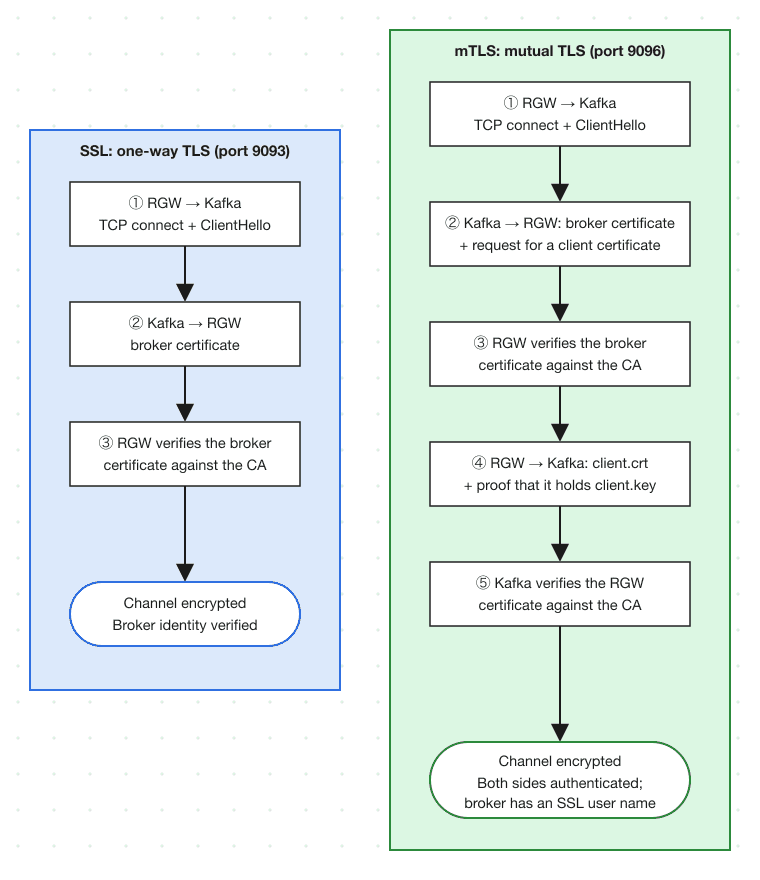
On the broker, the difference from plain SSL is one line, already present in the configuration above:
listener.name.mtls.ssl.client.auth=required
Confirm the broker is enforcing that before involving RGW. It takes a couple of minutes and separates a broker misconfiguration from an RGW one, a distinction that is harder to make later.
The Kafka CLI reads its client certificate from a keystore (a PKCS12 or JKS file, or a single PEM file holding both the key and the certificate), not from separate key and certificate files, so bundle them first:
openssl pkcs12 -export \
  -in client.crt \
  -inkey client.key \
  -name client \
  -out /etc/kafka/ssl/client.p12 \
  -password pass:mypassword
chmod 600 /etc/kafka/ssl/client.p12

cat > /tmp/mtls-client.properties <<'EOF'
security.protocol=SSL
ssl.truststore.type=JKS
ssl.truststore.location=/etc/kafka/ssl/server.truststore.jks
ssl.truststore.password=mypassword
ssl.keystore.type=PKCS12
ssl.keystore.location=/etc/kafka/ssl/client.p12
ssl.keystore.password=mypassword
ssl.key.password=mypassword
EOF

kafka-topics.sh \
  --bootstrap-server broker.example.com:9096 \
  --command-config /tmp/mtls-client.properties \
  --create \
  --topic mtls-notifications \
  --partitions 1 \
  --replication-factor 1
Created topic mtls-notifications. means the broker accepted the client certificate. The .p12 bundle has now served its purpose and RGW does not use it: librdkafka reads PEM files directly, which is what ssl-certificate-location and ssl-key-location are for.
aws --endpoint-url $RGW sns create-topic \
  --name mtls-notifications \
  --attributes '{
    "push-endpoint": "kafka://broker.example.com:9096",
    "kafka-ack-level": "broker",
    "use-ssl": "true",
    "ca-location": "/etc/ceph/y-ca.crt",
    "ssl-certificate-location": "/etc/ceph/client.crt",
    "ssl-key-location": "/etc/ceph/client.key"
  }'
Attach it to a bucket named mtls-bucket in the same way.
If the client key is passphrase-protected, add "ssl-key-password": "mypassword" alongside those. The three attributes map onto librdkafka's ssl.certificate.location, ssl.key.location, and ssl.key.password.
kafka-console-consumer.sh \
  --bootstrap-server broker.example.com:9096 \
  --consumer.config /tmp/mtls-client.properties \
  --topic mtls-notifications \
  --from-beginning

# elsewhere
echo "hello mtls" > /tmp/mtls-test.txt
aws --endpoint-url $RGW s3 cp /tmp/mtls-test.txt s3://mtls-bucket/mtls-test.txt
With debug_rgw_notification at 20, the RGW log lists each option it configured when it opens the connection:
cephadm logs --name rgw.<id> | grep "Kafka connect:"
Kafka connect: successfully configured SSL security
Kafka connect: successfully configured CA location
Kafka connect: successfully configured client certificate location
Kafka connect: successfully configured client key location
Kafka connect: successfully configured security
The two client ... lines are the ones that distinguish mTLS from one-way TLS: if they are missing, RGW connected without a client certificate and the broker either rejected it or was not requiring one. Both endpoints are now authenticated cryptographically, and the broker identifies RGW by the SSL user name from its certificate.
When events do not arrive 
Common causes:
listenersandadvertised.listenersmismatch. The broker fails during startup in a way that does not obviously point at this, so check the broker log before suspecting RGW.- The certificate SAN does not match the address being used. Connecting to
localhostwith a certificate issued forbroker.example.comfails whenverify-sslistrue. Correct the certificate rather than disabling the check. rgw_allow_notification_secrets_in_cleartextis not set. Without it RGW refuses to create a topic carryinguser-name/passwordover a non-HTTPS S3 request, and refuses to use those credentials on a non-TLS Kafka connection, loggingKafka connect: user/password are only allowed over secure connection.- The CA certificate or client key is missing or unreadable. The paths in the topic attributes are resolved on the RGW host (inside the RGW container, for a cephadm deployment, so the files must be mounted there) and opened by the RGW process user, so that user has to be able to read them. Go no wider than it needs: a private key at mode
0644is readable by every account on the host, which is not a state to leave a production key in.0600owned by the RGW user, or0640with a shared group, is the target. kafka-ack-levelisnone. Delivery failures become invisible. Usebrokerwhile verifying a configuration.
The RGW log is the place to check what RGW actually configured, which is not always what was intended.
Summary 
Read the two layers separately: the connection columns say what is encrypted and which ends are authenticated, the user column says whether the broker learns a user at all.
| Kafka protocol | Encrypted | Endpoint authentication | User identified by | RGW topic attributes |
|---|---|---|---|---|
| PLAINTEXT | No | Neither end | Nobody | push-endpoint |
| SASL_PLAINTEXT (PLAIN) | No | Neither end | Password, sent in the clear | user-name, password |
| SASL_PLAINTEXT (SCRAM) | No | Neither end | Password proof | user-name, password, mechanism |
| SSL | Yes | Broker only | Nobody | use-ssl, ca-location |
| SASL_SSL (PLAIN) | Yes | Broker only | Password, inside TLS | use-ssl, ca-location, user-name, password, mechanism |
| SASL_SSL (SCRAM) | Yes | Broker only | Password proof | same, with a SCRAM mechanism |
| SSL + mTLS | Yes | Broker and RGW | SSL user name | use-ssl, ca-location, ssl-certificate-location, ssl-key-location |
The upstream bucket notification suite in src/test/rgw/bucket_notification/ exercises these against a live broker: the plaintext baseline under the kafka_test marker, and SSL, SSL with certificate verification disabled, mTLS, SASL_PLAINTEXT and SASL_SSL with PLAIN, SCRAM-SHA-256 and SCRAM-SHA-512 under kafka_security_test. The listeners those tests expect are the ones in the broker configuration above, and kafka-security.sh in the same tree generates their certificates.
Part 2 covers GSSAPI (Kerberos) and OAuthBearer, where authentication is delegated to a KDC or an OIDC provider instead of living in the topic configuration. As of this writing, neither is in a Ceph release yet.