Reclaim Ceph Capacity Through CephFS Transcoding
Data expands to fill available storage (and beyond)! 
It used to be that enterprise storage meant 6RU rackmount Fujitsu 2351 Eagles, each holding a mind-boggling 380 MiB of data: enough for a whole company!
Today that 380 MiB can't even hold a 4k pickleball video. Enterprises, educational instutitions, and really just about anyone these days demand storage capacities that start on the order of hundreds of tebibytes and rapidly grow to pebibytes.
As this article is written in the spring of 2026, the memory market, which includes DRAM, SSDs, and legacy HDDs, has experienced a dramatic escalation of pricing. It is not uncommon to be quoted a price four times what the same hardware cost a year ago, and there are signs that it is going to get worse before it gets better.
What's a poor ammonite to do??
Cephers find themselves between the Charybdis of quotes approaching Disaster Area's hypermathematics and the Scylla of hungry users armed with torches and git forks.
Git forks, pitchforks. Get it? Sigh. Tough room. Anyway...
Short of nuking the site from orbit, how do we make everyone happy, or at worst mildly discontented?
Efficiency!
CephFS 
CephFS is a popular, highly available and scalable software-defined POSIX-style distributed filesystem that can easily store tens of pebibytes of precious data. Or, alternately, cat videos.
Ceph deployments often begin small, with replicated pools for perceived performance needs. As the cluster grows to more nodes and more data, it may become feasible and desirable to switch to Erasure Coding (EC) to make more efficient use of raw capacity.
An EC pool thus can require substantially less raw storage for a given amount of user data, or store gobs more user data on a given amount of raw capacity
This EC overhead table presents efficiency (space amplification) factors for a spectrum of EC profiles. Replicated pools usually maintain three copies of data, so for comparison they manifest an overhead factor of 3.0. EC 4+2 or 6+3 presents a factor of just 1.5, with some tradeoffs, including some space amplification for the very smallest files.
The use of EC has traditionally been limited to workloads with modest write performance requirements. With SSDs, however, many workloads are actually compatible with the tradeoffs of EC. Moreover, the Ceph Tentacle release delivered the highly anticipated Fast EC which brings EC pool performance much closer to parity with that of replicated pools, enabling its use for workloads that previously demanded replication.
Cephers often think that once data is written to a RADOS pool, the data protection strategy is carved in stone unless one manually and disruptively moves data to a different pool. RGW Lifecycle policies however offer a way to transition Ceph Object Storage data between storageclasses and pools transparently, but we're to talk about the draft ^H^H^H erm .. CephFS
CephFS file systems / volumes typically provision one RADOS pool for metadata (foo.meta) and one for data (foo.data). One can however attach multiple pools to a CephFS volume, which may live on different media (HDD, mainstream NVMe SSD, coarse-IU QLC SSD) and/or employ different data protection strategies (Replica 3, EC 4+2, EC 8+3, EC etc). When one chooses to use EC to hold CephFS data, it's a good idea to provision at least two data pools: the first (default) data pool holds inode backtraces and HEAD objects. When there are no other data pools, the first data pool also holds file data.
When one or more additional (and often EC) data pools are added to a CephFS volume, inode backtraces and HEAD objects are still placed in the first / default data pool. But how do we place bulk file data?
One of the more obscure but very, very useful features of CephFS is the ability to set file layouts. These are somewhat akin to RGW / S3 storage classes in that they can be applied to CephFS volume (sub)directories or individual files to gate data placement. Which is downright smurfy, but when one has pebibyates of data on replicated or expensive storage and wishes to transparently migrate it to the new data pool(s), what to do? Setting the layout on a directory, even the top level directory of a volume, directs new files to the desired pool, but existing files must be copied to new files in order to change their placement. Doing this with a recursive cp, tar, or cpio command can be a lot of work, especially if one does not have sufficient capacity to temporarily store an entire second copy of data. Moreover, we need to consider symlinks, which are stored only in the .meta pool, files with multiple hard links, files that are currently being written, and files that may be read or written while copying.
The solution 
Recently as a Ceph Ambassador I crossed paths with a community member storing breathtaking amounts of data, and adding more every day. All of this CephFS data had been traditionally stored on mainstream TLC SSDs in replica 3 pools, because these are the defaults for performance.
Quotes for capacity expansion turned out to be dramatically higher than budgeted, and they were in a bind.
I helped them discover that while their MDS estate is very busy, at the RADOS level their datalake is read-mostly, with modest to moderate client read workload. They do need the reads to be fast, but write speed is of lesser concern. This is a classic workload for EC, and for QLC (or QLC-class) SSDs. I helped them identify additional QLC-class SSD options, and proposed a converstion of the CephFS datalake to EC to reclaim ... well they don't want to disclose numbers, but let's say a many zeros of existing raw capacity to defray and defer spending until such a time that the NAND market cools down.
Enter this ultimate answer to EC, CephFS, and everything: a transcoder script posted by Reddit user marcan42. This script is a terrific inspiration, but bears a number of shortcomings. I worked with the community member to enhance the script: my fork can be found here.
In a nutshell, the script walks a CephFS volume or subdirectory thereof, processing files by creating a copy with the new file layout then atomically renaming the copy over the original. This strategy means that clients can continue to access data without risk of disruption, corruption, or divergence. Care is taken to avoid symlinks and to properly handle files with multiple hard links.
By working on one file at a time, we avoid the need for enough unused capacity for a second if temporary copy of a directory tree or even entire volume. Because if we had that kinda space, we mostly wouldn't be having this conversation. Mostly. This approach also helps avoid divergence and reduce or eliminate the need for laborious cleanup in the event of a network or client host outage.
Painstaking care is taken to detect files that change while being processed so that they are not diverged, corrupted or deleted. Options are present to constrain the files that are transcoded:
- To a specific subtree of a volume
- To files that are not multiply hardlinked, out of an abundance of caution
- To files older and/or newer than a specified number of days, especially when older files are much less likely to be changed or deleted during processing
- To files above a specified minimum size.
The script by default processes four files in parallel; this number may be adjusted on the command line to trade off network and client impact against elapsed time.
When using EC, the very smallest files can actually consume more raw capacity than replication. The FastEC improvements in the Ceph Tentacle release reduce but do not eliminate this concern. In releases before Tentacle, RADOS always writes complete stripes. When using conventional media, and with OSDs created on releases newer than Octopus, the default value of bluestore_min_alloc_size is 4KiB. Say we're using an EC 8+3 data pool and a user creates a 1 byte file. A full-stripe write will allocate 11 * 4 = 44KiB of raw storage. For a single file this is negligible, but with millions or billions of files this space amplification adds up.
This fantastic resource from Mark Nelson quantifies and visualizes this space amplification dynamic, which in the Octopus / Pacific area lead Ceph developers to enable lowering the default bluestore_min_alloc_size. Today, however, coarse-IU QLC SSDs are an increasingly compelling alternative to both conventional TLC SSDs and HDDs. They offer cost effectiveness and fantastic density: as of March 2026, U.2 SKUs with the incredible capacity of 245 tebibytes are entering the market.
These however do best when bluestore_min_alloc_size is matched to the IU, which is usually 16 KiB, but for older drives may be as high as 64 KiB. For conventional media and popular EC profiles a minimum size of, say, 500 KiB may be specified to avoid space amplification. For many deployments, much larger files may render a bit of space amp for tiny files more or less moot, but the option is there so that individuals may choose what's right for their file demographics.
It is said that a picture is worth 1024 words, so here's another obigatory contextually appropriate AI-generated octopus:

Oh, you want hard data. ABOUT THE TOPIC. Fine. Be like that.
This first graph shows the raw capacity used by the original Replica 3 data pool of a real-world CephFS volume in green, and the capacity used by the new EC 6+3 pool in blue. The barely-visible red line depicts the obligatory .meta pool. (Ignore the dots, they are Prometheus scraping artifact). One can see readily that as the amount of data consumed by the first pool decreases the amount consumed by the new pool rises -- but at very roughly half the rate. This is expected when transcoding from Replica 3 (space amp 3.0) to EC 6+3 (space amp 1.5). The spans where the lines flatten out somewhat correspond to expanses of files that were too new, too small, symlinks, or multiply linked. The script can handle multiply-linked files, but with as many as 7000 (!) links to some files, those are skipped for the initial runs.
This transcoder run specified:
- 15 threads
- Minimum 500 KiB file size
- Minimum 1 day file age
- Skipping multiply-linked files
- A 6+3 EC policy
With these options, files were processed at 5-15 TiB per hour. Your mileage may vary.
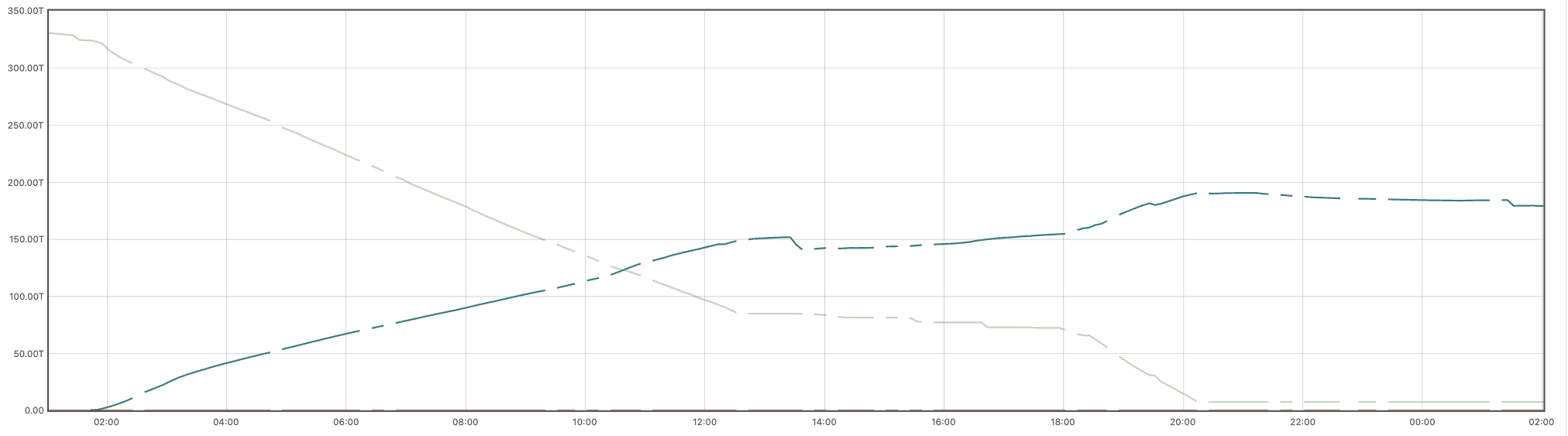
This second graph shows the sum of the series in the above graph, more simply visualizing the aggregate savings in underlying raw capacity. Here we can see that the subject volume consumed roughly 330 TiB before transcoding, but only 185 TiB after, reclaiming 44% of raw capacity. The 7% deviation from the theoretical ideal is the cumulative effect of files too small, too new, or too multiply linked for transcoding.
The beauty of this approach is that the script is idempotent. One may run it again with different, or even the same parameters to pick up files as they pass the minimum age cut-off, or with a smaller threshold. The community member that inspired this post is not yet running Tentacle; once they have upgraded and enabled EC optimizations on their pools, they plan another pass over the data with a smaller threshold.
One does not need to re-run the transcoder to pick up newly-created files, as the process leaves the default layout for the directory (which may be the volume's root) set to the new pool. It is possible, with repeated runs, to arrange arbitrary subdirectory trees to use one layout (pool) or another, with inheritance and overriding. It is even possible to migrate desired subsets of data back to the default pool, or to another pool on different media. The script is written in a way that it does not reprocess files if they are already set to the target layout, ensuring idempotence.
This process does entail the creation of an additional RADOS pool for each CephFS volume transcoded, so be sure to account for that in your manual or autoscaler PG strategy. While not widely known, Ceph currently has a hard limit of 256 CRUSH rules per cluster. The transcoding setup script takes care of creating new EC profiles and CRUSH rules only as necessary, re-using them for additional CephFS volumes with the same profile. When executing, take care to manage pg_num on both old and new pools, via the PG autoscaler or other means. As data is moved off the old pool, the PG budget it was allocated can be reduced, and PGs added to the new pool.
As a rule of thumb, a PG / shard should hold no more than roughly one hundred thousand RADOS objects, or 200 TiB. Remember that the old pool may still hold many RADOS objects, but not much data volume, so avoid the temptation to reduce pg_num too low. The little-used rados df command can help gauge what's right. Also remember that EC PGs are sharded, so in the above example, each EC 6+3 shard is only 16% the size of the previous replica 3 PGs, so don't overdo pg_num on a new EC pool. Depending on the EC profile, the sufficient value for the new pool may be 25% or so of the original replicated pool's value.
The setup script that manages pools and layout xattrs now has an option to create a new pool with a specified number of PGs. It's best to get this at least vaguely right up front, when PG creation is fast and painless on an empty pool. Splitting or merging PGs later when the pool holds tebibytes or pebibytes of data is much slower and more impactful.
When migrating between two EC profiles, use your judgement.
To-do: filter on filename regexes.
This has not been tested on CephFS subvolumes, nor has it been tested transcoding back to a replicated volume. This analysis and code are presented as-is with the goal of delivering value to the Ceph community. No warranty or support should be inferred. It is free, and worth every penny.
Do not taunt the script or stare into it with remaining eye.
Suggestions or improvements are welcome, on a best-effort basis.
The upcoming Umbrella release is expected to introduce transparent pool migration at the RADOS layer. This ability will be very useful and may one day obviate the script discussed here, though one should approach its use carefully after thorough testing. The need for compatible clients will, notably, limit the ability of many CephFS deployments to use that new approach until compatible kernels make it into your Linux distribution(s) in use. The file-layout based approach we've explored here works until the new transparent migration can be rolled out.
About the author, Anthony D'Atri 
- Ceph at scale since 2014
- (Successfully since 2017)
- Ceph Ambassador
- Ceph Documentation Lead
- Author: Learning Ceph, Second Edition
- QLC fanboy
- Ceph is quite graphically a part of me